Why we stopped trusting third-party ETL tools and built our own Teradata-to-cloud replication engine using native database commands.
The core design principle was simple: at every hop in the pipeline, use the database’s own native bulk-transfer mechanism. Never touch a row iterator when a bulk command is available.
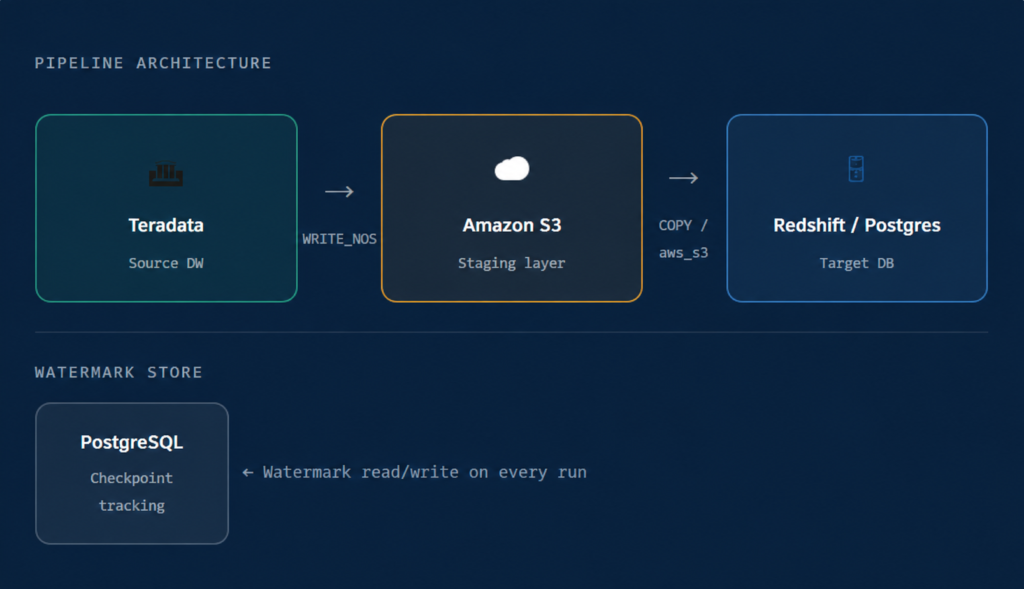
Instead of extracting data through a connection and streaming it byte by byte, we used Teradata’s WRITE_NOS command to write data directly to Amazon S3 in bulk. This is a server-side operation – Teradata does the heavy lifting, writing massively parallel output straight to object storage. No driver bottleneck. No memory pressure on the client. Just raw throughput.
Redshift’s COPY command is the fastest way to get data into Redshift, bar none. It reads from S3 in parallel across all compute nodes. We load first into a staging table, then merge into the target using the primary key – giving us a clean, idempotent upsert on every run.
When the client expanded the use case to PostgreSQL targets, the architecture barely changed. PostgreSQL’s aws_s3.table_import_from_s3 extension provides the same native-S3-import pattern. The export step was unchanged; we simply wired in a new destination command. This validated that the design was genuinely composable, not just a one-off trick.
Full-table refreshes are wasteful at scale. We needed incremental replication: only copy rows that are new or changed since the last run. The mechanism for this is a watermark – a record of the highest primary key (or timestamp) seen in the last successful load.
WRITE_NOS as a filter, exports only the delta, loads it into a Redshift staging table, and merges it into the target. Then it writes the new watermark back to Postgres. The whole loop is atomic enough that a failed run simply retries from the last clean checkpoint. “The staging table + merge pattern is what makes this reliable at scale. New rows are inserted, changed rows are updated — no duplicates, no full refreshes, no data loss.”
A fast pipeline that only your platform team can operate isn’t a product – it’s a prototype. We wanted any data engineer in the organization to be able to onboard a new table in minutes, without reading a line of Python.
The answer was a declarative YAML interface with an intentionally SQL-like syntax. Install the package, write a config file, run it. That’s it.
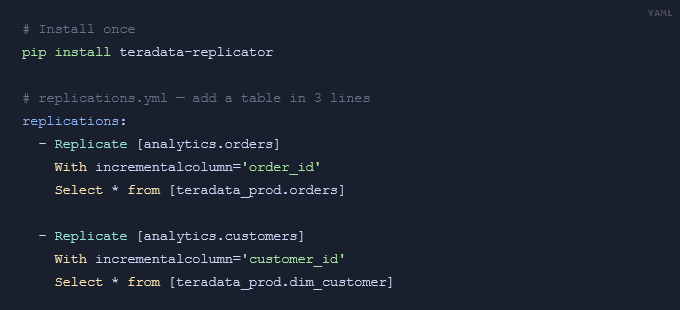
The SQL-like syntax was deliberate. Any engineer or analyst comfortable with SELECT statements can read and write these configs. The package resolves the watermark, runs the export, handles the staging merge, and updates the checkpoint – all invisible to the consumer.
The package fetches the last-replicated value for each table from the PostgreSQL checkpoint store.
Teradata's WRITE_NOS exports only rows where the incremental column exceeds the watermark, directly to S3.
Redshift's COPY (or aws_s3.table_import_from_s3) bulk-loads the delta into a temporary staging table.
A MERGE operation upserts staging rows into the target table using the declared primary key - inserts new, updates changed.
The new high-water mark is written back to PostgreSQL, ready for the next scheduled run.
| Component | Technology | Role |
|---|---|---|
| Source | Teradata | Legacy enterprise data warehouse |
| Export | WRITE_NOS | Native server-side bulk export to S3 |
| Staging layer | Amazon S3 | High-throughput decoupled buffer |
| Redshift import | COPY | Native parallel bulk load |
| Postgres import | aws_s3.table_import_from_s3 | Native S3-to-Postgres extension |
| Checkpointing | PostgreSQL | Watermark and run-state tracking |
| Interface | YAML + pip | Config-as-code for consumers |
| Distribution | Artifactory | Internal package hosting |
The lesson here isn’t specific to Teradata or Redshift. It’s a general principle: generic tools solve the general case, but native tools solve your case. Every major database has bulk-transfer primitives that exist precisely because row-by-row iteration doesn’t scale. Before reaching for a third-party connector, it’s worth asking: what does this database already know how to do really fast?
In our case, the answer was sitting in the documentation the whole time. We just had to build around it.
The configuration-as-code interface, watermarking design, and multi-target architecture are all available internally via Artifactory. Reach out to the Data Platform team to get onboarded.