Every ERP rollout in the last three decades has quietly assumed the same thing: the system is a container, and a human is the engine that moves data through it. Someone opens the form. Someone matches the invoice. Someone stares at a reconciliation report at 9pm because month end doesn’t negotiate. The software has gotten faster, prettier, and cloud native, but the operating model underneath it hasn’t actually moved. A person still has to show up and drive.
Microsoft just changed that assumption for Dynamics 365 Finance & Operations, and it’s a bigger deal than another Copilot feature announcement. With the Dynamics 365 ERP MCP server and the agents built on top of it, F&O is being re-architected so that AI doesn’t just describe what should happen next. It reaches into the same forms, data entities, and business logic a person would use, and it acts, inside boundaries the business explicitly sets.
That’s not a UI refresh. It’s a different answer to the question “who runs the ERP,” and it has real implications for how finance and operations teams will be structured within the next two to three years. Here’s what actually changed, how the mechanics work, and what has to be true in your environment before any of this is safe to turn on.
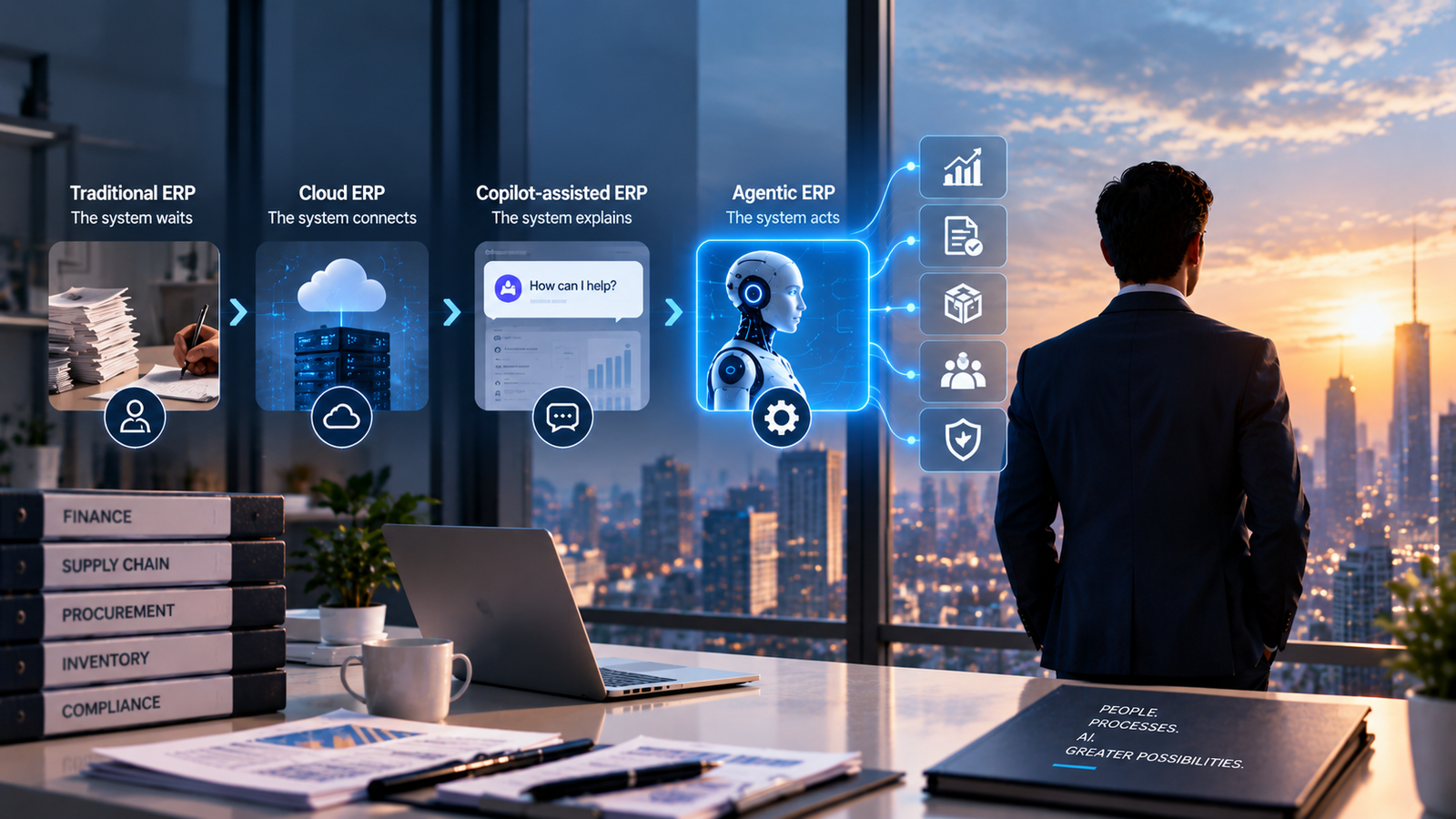
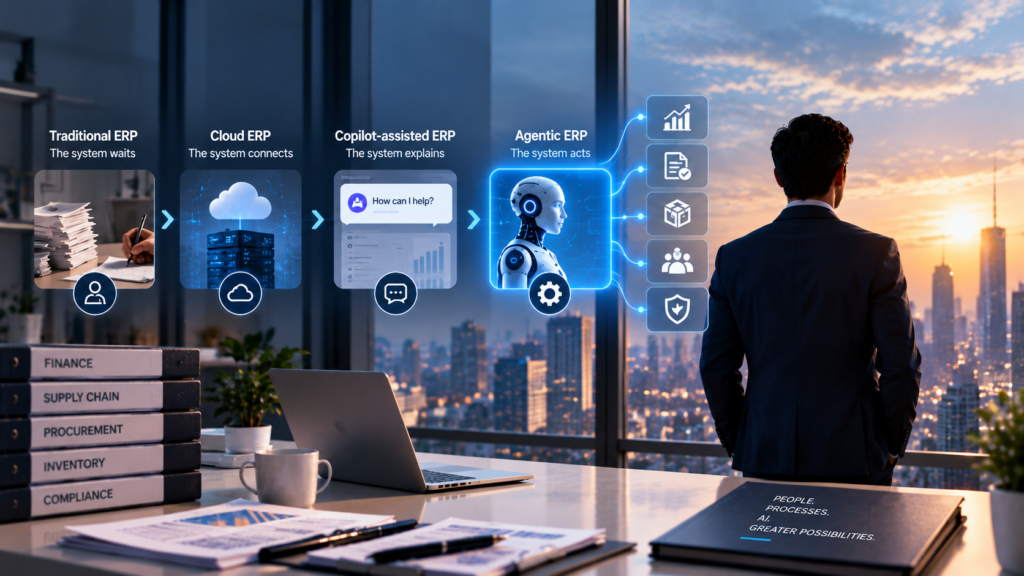
Four stages, and each one changes who, or what, is allowed to initiate work in the system.
Traditional ERP: the system waits. On-premise AX and early Dynamics 365 were built around modules and forms that did nothing until a person opened them. The system was a ledger of record, not a participant. Every transaction started with a human typing something in.
Cloud ERP: the system connects. Moving F&O to Azure brought elastic infrastructure, continuous updates, and APIs that let other systems talk to it. Integration got dramatically easier. But the operating model was untouched. A person, or a scripted integration standing in for one, still had to initiate almost everything.
Copilot-assisted ERP: the system explains. Copilot arrived to summarize, draft, and answer questions inside F&O. Ask it why a variance occurred and it pulls the numbers together in seconds. That’s a genuine productivity gain, but it’s still a closed loop: you ask, it answers, and the workflow proceeds exactly as it always did. Nothing executes until a person clicks the button.
Agentic ERP: the system acts. This is the actual break. Instead of a chat window layered on top of the ERP, you get autonomous agents living inside a business process, watching for the conditions that matter, and executing the response themselves, within limits someone has explicitly defined. An agent doesn’t wait to be asked whether the subledger ties to the general ledger. It checks continuously, and when it hits a mismatch it can’t resolve, it escalates with the context already assembled instead of leaving a person to reconstruct what happened.
Microsoft’s own term for where this lands, formalized through the 2026 Release Wave 1, is “agentic ERP”: a platform where AI sits inside execution, not just inside analysis.
It’s worth being precise here, because “AI agent” gets used loosely.
Copilot vs. an agent. Copilot is conversational and pull-based. You open it, ask a question or give it an instruction, and it responds within that single interaction. An agent is push-based and persistent. It runs continuously or on a schedule, watches for defined conditions inside your ERP data, and acts on its own once those conditions are met, without someone initiating the conversation each time.
What makes something an agent, not automation. Traditional workflow automation follows a fixed script: if X happens, do Y, every time, no exceptions. Agents are different because they reason. They combine ERP data with business context and, within the boundaries they’re given, decide the right response to a situation that automation rules alone can’t fully anticipate. That’s the real distinction: an agent can handle a case nobody explicitly scripted for, because it’s reasoning over the situation rather than matching it against a fixed rule.
The three things an agent actually needs to do real work. To be more than a smarter chatbot, an agent needs to reason about a situation, access the live data behind it, and take action inside the application, not just describe what should happen. Dynamics 365 agents, like the Account Reconciliation Agent in Finance, are built around exactly that loop: observe, reason, act, and escalate to a human when the situation falls outside their defined boundaries.
None of this works without a way for an agent to actually reach into the ERP safely. That’s what Microsoft built the Dynamics 365 ERP MCP server to solve.
What MCP is doing here. Model Context Protocol is an open standard for connecting an AI agent to a system’s data and functions in a structured, governed way. Microsoft’s Dynamics 365 ERP MCP server applies that standard specifically to finance and operations apps, giving agents a defined, secure path into F&O rather than an open door.
From static to dynamic. The first version of this server, shown at Build 2025, shipped with a fixed set of 13 tools covering specific, hardcoded actions like releasing a purchase requisition or finding approved vendors. That static server is being retired through 2026. Its replacement takes a fundamentally different approach: instead of a short list of pre-built actions, it exposes the underlying forms, data entities, and callable logic dynamically, unlocking a far larger surface of what an agent can actually do inside F&O.
Three categories of tools. The current server organizes agent capability into three tool types. Data tools handle standard create, read, update, and delete operations against F&O data entities, which is the most efficient path for routine CRUD work. Form tools let an agent navigate the same pages a person would, opening forms, filtering grids, setting field values, and clicking the actions available on that form, through server APIs rather than a simulated screen. Action tools go a level deeper, letting an agent find and directly invoke the underlying classes and custom APIs that power specific business logic.
Why this actually matters. Because form tools work through the forms themselves rather than static endpoints, an agent isn’t limited to a curated list someone predicted in advance. It can reach into the same functions, across finance, supply chain, HR, and project operations, that a human user reaches through the client. And because those tools run through the application’s existing server APIs, every action an agent takes still inherits the same security roles, permissions, and audit trail that govern a human user. Nothing bypasses the controls already built into your environment. That’s the detail that makes this safe enough to take seriously.
This is less theoretical than it sounds. A few patterns are already live in F&O deployments.
Finance reconciliation. An agent matches subledger balances against the general ledger continuously instead of once a month, and only surfaces the exceptions a human actually needs to look at.
Purchase and order processing. An agent can capture an incoming invoice, match it against the purchase order and receipt, and route only the mismatches for review, instead of a person touching every single invoice regardless of whether it’s clean.
Vendor management. Agents can screen vendor performance against defined criteria and prepare recommendations for a requisition, pairing transactional F&O data with analytical insight to inform a decision before a human signs off.
Inventory actions. When stock crosses a threshold, an agent can trigger the appropriate replenishment workflow directly, rather than waiting for someone to notice the alert in a report.
Financial analysis. Agents can pull together variance analysis and data preparation directly in the tools finance teams already work in, like Excel and Outlook, instead of forcing people back into a separate ERP screen for every question.
Exception management. Maybe the most important pattern of all: agents are consistently built to handle the routine 80% of a process and hand off the genuinely ambiguous 20% to a person, with the context already assembled. That’s the shape of almost every use case above. It’s not about removing people from finance and operations. It’s about only pulling them in where judgment actually matters.
None of this works well if it’s bolted onto a messy environment. A few things need to be true first.
Clean ERP data. An agent reasons over whatever data it’s given. If your vendor records are duplicated, your item masters are inconsistent, or your GL mappings have drifted, an agent will act on that mess with the same confidence it would act on clean data, just faster.
Proper security roles. Because agent actions run through the same server APIs and permission model as human users, your security role design becomes the actual boundary on what an agent can do. If roles are too broad today, agents will inherit that exposure.
Well-defined business processes. Agents need clear conditions for when to act and when to escalate. If your reconciliation or exception-handling process is inconsistent from one person to the next today, there’s no clean pattern for an agent to learn or follow.
Integration architecture. Between the ERP MCP server, the Analytics MCP server, Copilot Studio, and your existing integrations, you need a coherent picture of how these pieces talk to each other, not a pile of point connections nobody fully owns.
Governance. Someone in your organization needs to own the answer to “what is this agent allowed to do without a human in the loop, and what always requires sign-off.” That answer shouldn’t be assumed. It should be written down, tested, and revisited as agents take on more.
Get these five right, and agentic ERP is a genuine step forward. Skip them, and you’re just automating your existing problems at a faster pace.
The direction is clear even if the pace of individual features isn’t. Microsoft is moving from a curated, static set of agent actions toward a dynamic model where nearly any form, entity, or business function in F&O can be reached by an agent, governed by the same security model that already governs your people. Multi-agent coordination, where a supply chain agent and a finance agent respond to the same event in real time, is already showing up elsewhere in the Dynamics 365 portfolio and will almost certainly deepen inside F&O next.
The organizations that get real value out of this won’t be the ones who turn on every available agent the day it ships. They’ll be the ones who used this moment to actually clean up their processes, tighten their security model, and figure out where autonomous execution earns trust, one workflow at a time.
Talk to our Dynamics 365 experts about assessing your current environment and identifying opportunities for intelligent automation.